
Augmented Driving5.0.0 - App Store
You'll be able to see results in few seconds.
Publisher Description

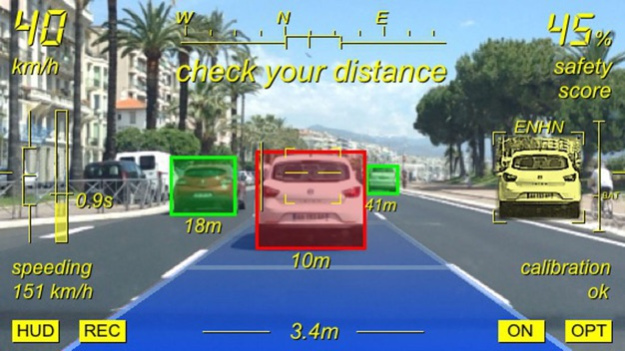
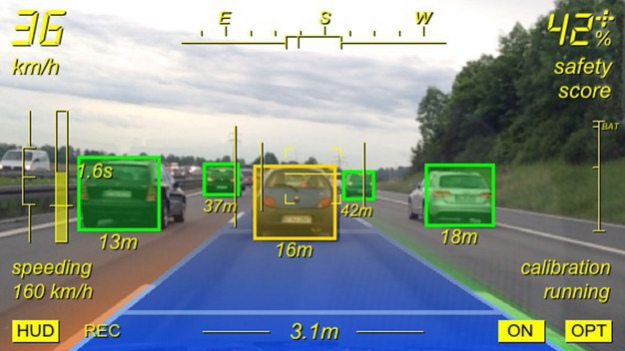
### Major release V5.0 now available with NEW amazing features
The original Augmented Driving app available since its first acclaimed launch in early 2010.
Augmented Driving V5.0 works with iPhone and iPad and requires iOS8.
Augmented Driving - Upgrade your car with augmented reality and advanced real-time object detection. Experience augmented reality in action on the road.
What our customers think:
- "Great for long boring drives... a fantastic way to ensure I don't forget my caution..."
- "Nice to make people keep a safe distance from other vehicles..."
- "Saved my life... Augmented Driving's lane detection woke me up behind the wheel no less than 3 times."
- "Detection of the car in front moving in stop and go traffic...Awesome and damn useful..."
- "Most innovative App in the store. Shows what really is possible with the iPhone..."
- "What a cool app! I can't believe it works so well..."
Are you often going for longer trips on highways or country roads, or are you stuck in daily stop-and-go traffic? Then you do not want to miss the impressive technology of Augmented Driving 5.0 to support safer driving:
# Safety Score:
- Real-time evaluation of your driving based on distance to other vehicles, lane keeping and speed
- From poor driving (0%) over normal driving (50%) to perfect driving (100%)
- Tap on "course" and "safety score" display to toggle, double tap to reset
# Vehicle Detection and 2-Level Safety Distance Monitoring:
- Vehicles in front of you and on neighboring lanes are detected and dynamically highlighted
- A close-up view zooms in on the relevant vehicle
- Relevant information, such as vehicle distance and time gap, is displayed in the HUD
- User-adjustable 2-level distance warning
# Lane Detection and Lane Departure Warning:
- Your own lane is highlighted with dynamic overlays in the augmentation video display
- The width of your lane and your distance to its borders is indicated
- As soon as you cross the lane markings you are informed by an acoustical signal
# Stop-and-Go Assistant:
- If you come to a dead stop in stop-and-go-situations, Augmented Driving detects moving off traffic in front of you and issues an acoustical information
# Speeding Avoidance:
- To avoid speeding you are warned when a user-defined speed-limit is exceeded
# Visual Logbook and Video MP4-Recording:
- Take screenshots manually or by enabling the intelligent, situation-adaptive automatic recording feature
- Save the video screen contents as a full MP4 video stream including a buffer of the past 5 seconds
- Videos and screenshots are stored in your photo album
# Information HUD:
- Relevant status and driving information such as your current speed and driving course are overlaid to the augmented video display
# Sound and Voice Output:
- Acoustical warnings can be configured to be a standard sound or an appealing voice output
- Multi-language voice output in English (voices for US, UK), French, German, Spanish, Italian, Japanese and Chinese
And finally, everything is presented in an incredibly cool futuristic visual style !
Important note:
For operation, GPS availability and a fix mount on the windshield are required. Please make sure to follow the safety notes and consider the instructions of the installation video for best performance. Augmented Driving is intended for promotion of modern image analysis and object detection technologies on portable devices only. Augmented Driving is not suited for dynamic driving situations or operation in bad lighting conditions and must not be misused as a road safety system, e.g. for collision warning and the like. The application is strictly not designed to replace, substitute or complement any vehicle on-board safety or assistance systems. The end-user is in no way exempt from his duty of attention to the road and his due diligence.
Please also visit our webpage for more information.
Nov 10, 2017
Version 5.0.0
This app has been updated by Apple to display the Apple Watch app icon.
- 64-bit support.
- Re-worked modern design.
- Minor bug fixes and improvements.
About Augmented Driving
The company that develops Augmented Driving is imaGinyze. The latest version released by its developer is 5.0.0.
To install Augmented Driving on your iOS device, just click the green Continue To App button above to start the installation process. The app is listed on our website since 2017-11-10 and was downloaded 0 times. We have already checked if the download link is safe, however for your own protection we recommend that you scan the downloaded app with your antivirus. Your antivirus may detect the Augmented Driving as malware if the download link is broken.
How to install Augmented Driving on your iOS device:
- Click on the Continue To App button on our website. This will redirect you to the App Store.
- Once the Augmented Driving is shown in the iTunes listing of your iOS device, you can start its download and installation. Tap on the GET button to the right of the app to start downloading it.
- If you are not logged-in the iOS appstore app, you'll be prompted for your your Apple ID and/or password.
- After Augmented Driving is downloaded, you'll see an INSTALL button to the right. Tap on it to start the actual installation of the iOS app.
- Once installation is finished you can tap on the OPEN button to start it. Its icon will also be added to your device home screen.
Program Details
System requirements
Download information
Pricing
Version History
version 5.0.0
posted on 2017-11-10
Nov 10, 2017 Version 5.0.0
This app has been updated by Apple to use the latest Apple signing certificate.
- 64-bit support.
- Re-worked modern design.
- Minor bug fixes and improvements.
version 5.0.0
posted on 2017-11-10
Nov 10, 2017 Version 5.0.0
- 64-bit support.
- Re-worked modern design.
- Minor bug fixes and improvements.
version 5.0.0
posted on 2017-11-10
Nov 10, 2017 Version 5.0.0
This app has been updated by Apple to display the Apple Watch app icon.
- 64-bit support.
- Re-worked modern design.
- Minor bug fixes and improvements.
version 4.0.1
posted on 2010-04-15
version 5.0.0
posted on 1970-01-01
2017年11月10日 Version 5.0.0
- 64-bit support.
- Re-worked modern design.
- Minor bug fixes and improvements.
version 5.0.0
posted on 1970-01-01
2017년 11월 10일 Version 5.0.0
- 64-bit support.
- Re-worked modern design.
- Minor bug fixes and improvements.
Disclaimer
Official App Store Link
We do not host Augmented Driving on our servers. We did not scan it for viruses, adware, spyware or other type of malware. This app is hosted by Apple and passed their terms and conditions to be listed there. We recommend caution when installing it.
The App Store link for Augmented Driving is provided to you by apps112.com without any warranties, representations or guarantees of any kind, so access it at your own risk.
If you have questions regarding this particular app contact the publisher directly. For questions about the functionalities of apps112.com contact us.
